Create interactive multimedia posters for education

Turn classroom assignments into creative learning experiences.

Give students a canvas to explore ideas, explain what they've learned, and bring their knowledge to life with images, videos, audio, text, and interactive content.

Whether you're teaching one class or managing an entire school district, Canvastera helps you organize creative learning around multimedia posters.

Free Communities are available today. Managed Group features are in development.

Canvastera poster editor with images, text and media arranged on a visual canvas

Free Communities vs. Managed Group Communities

Start with a free Community to collect and share classroom projects. When your school needs centralized administration, managed Student accounts, and teacher oversight, planned Group licensing offers a more structured environment.

Scroll sideways to compare classroom options

FeatureFree CommunitiesGroup Communities (In Development)
Best forIndividual teachers and informal collaborationSchools, districts, and organizations
Multimedia poster editorFull editor, except AIFull editor, except AI
PostersUnlimitedUnlimited
CommunitiesUnlimitedUnlimited within each Group
Community membersUnlimitedManaged seats, regular Members, and unlimited Viewers without licensed seats
Organization structureIndependent CommunitiesOne subscription → Multiple Groups → Multiple Communities
Community managementBasic member managementCentralized Groups, roles, and seat management
Student accountsPersonal Free/Single accountsManaged Student accounts
Password recoveryRequires a valid, working email addressGroup Mentors can reset Student and Member accounts in their assigned Groups without email. Admins can reset other Admin, Group Mentor, Member, and Student accounts under the subscription without email.
Poster ownershipBelongs to individual creatorsPosters created within a Group are stored under its subscription. Personal posters remain separate.
Teacher accessPosters voluntarily shared with the CommunityGroup Mentors can access managed Student posters, including drafts, only within their assigned Groups.
Student restrictionsPersonal account controlsStudents can access only assigned Group Communities
Personal private spaceAvailable to individual usersAvailable to Admins, Group Mentors, and Members, but not managed Students
Single Sign-On—SAML / OpenID Connect
AvailabilityAvailable nowIn development

Group licensing is being developed for organizations that need more control over student accounts and learning content. Purchasing a Group subscription during development supports this work.

View Plans and Pricing

Give your classroom projects more to explore

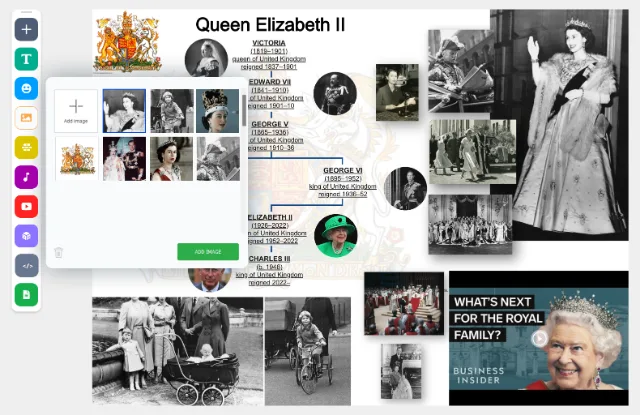
Canvastera poster canvas ready for media from a browser Browser image search beside the poster canvas

Drag, drop, and bring ideas together

Students can combine text, images, videos, audio, and visual resources to explain a topic in their own way. Search for media in the editor or drag supported content directly from their browser or device.

Instead of submitting disconnected files, students build one visual explanation that brings their research together.

Multimedia dinosaur poster combining visual research and media

Learn by creating, not just consuming

Ask students to explain a scientific process, document an experiment, tell a historical story, or explore a real-world problem.

They can record a short video, add narration, include interactive 3D models, or connect supported documents and educational resources.

The goal isn't simply to make something attractive. It's to help students organize ideas, make connections, and demonstrate understanding.
A Canvastera Community that groups related posters

Give every classroom a shared creative space

Create a free Community for your classroom, subject, or project.

Invite students to create their own posters and share finished work in one place. Explore their explanations, discuss different approaches, and let students learn from each other's work.

For schools that need more control, we're developing Group licensing with managed Student accounts, teacher oversight, and centralized organization management.

See What You Can Create

Explore real interactive multimedia posters, from classroom projects to creative stories. Find inspiration, then create your own.

From a classroom question to a story worth sharing

Start with a question

Introduce a topic or challenge during class. For example: “How do volcanoes form?”

Give students a short research assignment they can complete individually or in small groups. Ask them to find reliable information and consider how best to explain it.

Build an explanation

Students create an interactive multimedia poster. They combine short explanations, images, diagrams, videos, audio recordings, and interactive content.

Encourage students to create their own media, such as recording a short explanation on a phone, demonstrating an experiment, or interviewing a classmate.

Instead of simply collecting information, students decide what matters and how to communicate it.

Share, discuss, and reflect

Students share their posters with the class Community. Invite them to present their findings, explore each other's work, compare explanations, and discuss what they've learned.

Teachers can use the posters as a starting point for classroom discussion, formative assessment, or further exploration.

A poster doesn't need to be the end of the assignment. It can become the starting point for deeper learning.

Questions about Canvastera for Education

Is Canvastera free for teachers and students?

Yes. Canvastera offers a free multimedia editor, except AI features, unlimited posters, and unlimited Communities.

Teachers can create a Community, invite students, and collect posters without purchasing a subscription.

Paid Single subscriptions add website embedding, password protection, and extended content retention.

Advanced school and Student management is planned through Group licensing, which is currently in development.

How can I use Canvastera in my classroom?

Start by giving students a question, topic, or research assignment.

Students create interactive multimedia posters combining their own explanations with images, videos, audio, and other supported content.

They can then share their posters with the classroom Community for presentation, discussion, or feedback.

Canvastera works for individual projects and classroom activities across subjects such as science, history, geography, languages, and the arts.

What is the difference between a Free Community and a Group Community?

Free Communities are designed for sharing and collaboration. Teachers can invite students and collect posters, but each participant maintains their own account and controls which personal posters they share.

Group Communities are planned as part of a managed organizational environment. They will allow schools to manage Student accounts, supervise Student-created posters, and organize multiple Communities under centrally administered Groups.

How can schools and districts organize their Communities?

A Group subscription is being developed to support multiple Groups, with unlimited Communities inside each Group.

For example, a school district will be able to manage all its schools under one subscription:

  • District subscription
    • Lincoln Elementary School (Group)
      • Grade 5 Science (Community)
      • Grade 6 History (Community)
      • Art Class (Community)
    • Washington Middle School (Group)
      • Mathematics (Community)
      • Biology (Community)
    • Jefferson High School (Group)
      • Physics (Community)
      • Geography (Community)

The district Admin will create and manage the Groups representing schools. Group Mentors, such as teachers, will manage their assigned Groups and create Communities representing classrooms or subjects.

Managed seats will be distributed across Groups under the same subscription. The same managed user will be able to participate in multiple assigned Groups without requiring an additional seat.

A Group subscription will support unlimited Viewers without requiring licensed seats. Their view-only access will be controlled by Group and Community settings.

What user roles will Group licensing support?

Group licensing is being developed with five roles:

  • Admin: Manages the subscription, Groups, seats, roles, and Group content, including private posters, according to their organizational permissions.
  • Group Mentor: Manages assigned Groups and their Communities. Can access managed Student posters and drafts only within their assigned Groups.
  • Student: Uses a managed account without a personal private space. Can create private posters in an assigned Group or Group Community. All created posters are stored under the Group subscription and visible to authorized Admins and Group Mentors assigned to that Group.
  • Member: Participates using a personal Free or Single account, retaining ownership and privacy of personal posters. Can also create posters within a Group under its subscription plan.
  • Viewer: A view-only participant. A Group subscription supports unlimited Viewers without requiring a licensed seat. Viewers can see content permitted by Group and Community settings, but cannot create or edit Group posters.
Can Group Mentors see all Student posters?

Under the planned Group model, Group Mentors will be able to view managed Student posters and drafts only within their assigned Groups. This includes Student posters marked private in those Groups or their Communities.

Group Admins will be able to access Group content, including private posters, according to their organizational permissions.

In Free Communities, teachers can access posters that students choose to share, but cannot automatically access their unshared personal posters.

Can managed Students join other Communities?

No. Managed Student accounts will be restricted to their assigned Communities within the Group subscription.

Students will not be able to join public Communities, Communities outside their Group subscription, or Communities they have not been assigned to. Students can be assigned to multiple Groups under the same subscription.

Regular Members using personal Free or Single accounts are not subject to these managed Student restrictions.

Can Group Mentors access everyone's private content?

No. Under the planned Group model, Group Mentors will be able to access managed Student posters and drafts only within their assigned Groups.

Users with a role other than Viewer can create posters within a Group under its subscription plan. Private Group posters will remain visible to authorized Admins. Managed Student private posters will also be visible to Group Mentors assigned to that Group.

Community visibility will let other users and Students see shared content. Group and Community settings will control the allowed visibility.

Any user except a Student can create personal private posters outside a Group under their own Free or Single account. Only the creator can see those personal private posters. Joining a Group Community will not give Group Mentors access to them.

How long are Student posters stored?

Under the planned retention policy, Free posters will be retained for up to 18 months from creation. Editing or viewing a poster will not reset this period.

Single subscriptions will retain covered personal posters while active, followed by an additional retention period of up to 18 months after expiration.

Posters created within a Group by any user, including managed Students, will remain stored while its subscription is active, followed by up to 18 months after expiration, subject to applicable school agreements and legal requirements.

Users will receive advance notice before scheduled permanent deletion. Renewing an eligible subscription before deletion will preserve covered posters.

Posters created during Canvastera's beta period will receive a new 18-month retention period from the effective date of the updated policy.

How does password recovery work for classroom accounts?

For personal accounts in Free Communities, password recovery requires a valid, working email address that the account holder can access.

Under the planned Group model, Group Mentors will be able to reset Student and Member accounts within their assigned Groups without email.

Admins will be able to reset other Admin, Group Mentor, Member, and Student accounts under the Group subscription without email.

These Group account recovery features are in development.

Does Canvastera support school Single Sign-On?

Single Sign-On using SAML and OpenID Connect is planned as part of Group licensing. This functionality is currently in development.

Are managed Group features available today?

Not yet. Group licensing and its advanced organizational management features are in development.

You can already start classroom projects using Free Communities.

Purchasing a Group subscription during development supports the creation of managed Student accounts, organizational administration, and additional classroom management capabilities.

Give your students a canvas for learning.

Turn the next classroom assignment into an interactive multimedia experience. Create posters, bring students together in Communities, and discover new ways to explore, explain, and share knowledge.

Start with Free Communities today. Managed Group features are in development.