


Drag & drop media from any opened web browser!
Search connected media sources directly from the poster editor, or drag supported media onto your canvas from another browser window or your desktop.
Bring ideas, stories and classroom projects to life.
Combine images, video, audio, text and interactive 3D models in a multimedia poster. Create a classroom project, tell a visual story and give your ideas a place to grow.
Explore the editor during beta. See current plans and limits.
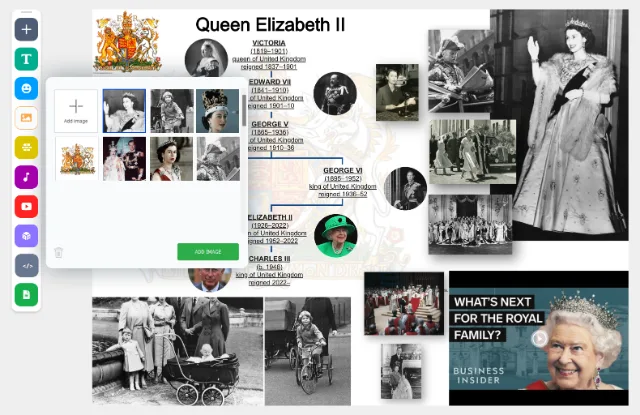
Search connected media sources directly from the poster editor, or drag supported media onto your canvas from another browser window or your desktop.

Put supported documents, maps, spreadsheets and presentations next to your images and video. Keep your explanation and its sources on one canvas.

Create or join a Community to collect related posters. Protect posters and Communities with a viewing password on an active paid plan. Poster pages are excluded from search engine indexing.
Real Canvastera projects, tutorials and stories shared by creators around the world.
An independent educator walks teachers through poster creation, interactive presentations and classroom ideas.
The school documented its annual student pet exhibition in an independently published school article.
Secondary-school students investigated energy use in transport, infrastructure and everyday habits for a regional science festival.
A grade-eight teaching resource explores Barbu Ștefănescu Delavrancea’s story through literary analysis, images and a student worksheet.
Explore real interactive multimedia posters, from classroom projects to creative stories. Find inspiration, then create your own.


Create unlimited interactive multimedia posters and communities for free. Upgrade for more publishing, privacy, and management options or to support our free tier.
Create and share without limits.
Get Started FreeEverything in Free, plus:
Planned capabilities
Group features are currently in development. Purchasing a Group subscription supports the development of classroom and organization management capabilities.
Communities are free and allow unlimited members to collaborate and share posters. Members control which personal posters they share with the Community.
A Group license adds centralized management for organizations. Admins can create multiple Groups, and each Group can contain multiple Communities, all under one subscription.
For example, a school district can use one Group subscription to manage several schools:
The District Admin manages the Groups (schools), while Group Mentors (teachers) manage their assigned Groups and create Communities (classrooms). Students are assigned to the appropriate Groups and Communities, where their work is managed and supervised.
These Group management capabilities are in development.
Yes. A Group subscription is being developed to support unlimited Groups, each containing unlimited Communities.
Admins will create and manage Groups, such as individual schools or departments. Group Mentors will create and manage Communities within their assigned Groups, such as classrooms or courses.
All Groups and Communities will share the same subscription and available managed seats.
A Group subscription will provide a shared number of managed user seats that can be distributed across multiple Groups and their Communities. For example, a district can purchase seats centrally and distribute them among its schools.
The same managed user can participate in multiple assigned Groups without requiring an additional seat.
Viewers do not consume managed seats. A Group subscription will support unlimited Viewers, with view-only access controlled by Group and Community settings.
Regular Members use their personal Free or Single accounts. Their personal content remains separate from the Group subscription.
Group licenses are being developed to support five roles:
Under the planned Group model, any user except a Student can create personal private posters that only they can see, within their Free plan limits or their own Single subscription.
Users with a role other than Viewer can also create posters within a Group under its subscription plan. A private poster in a Group remains visible to authorized Admins.
Students can create private posters in a Group or in a Group Community. Their posters, including drafts, remain visible to authorized Admins and Group Mentors assigned to that Group.
Community visibility lets other users and Students see shared content. The allowed visibility is controlled by the Community and Group settings.
Joining a Group Community does not give Admins or Group Mentors access to personal private posters outside the Group.
No. Managed Student accounts will be restricted to their assigned Communities within the Group subscription.
Students will not be able to join public Communities, Communities outside their Group subscription, or other Group Communities to which they have not been assigned. This keeps Student work within the organization’s managed environment.
Not yet. Group functionality is currently in development.
Purchasing a Group subscription supports the continued development of these features. The planned management capabilities are not yet available.
All users can create unlimited posters. Retention depends on the subscription associated with the content.
When a paid subscription expires, its covered content will receive an additional retention period of up to 18 months before deletion, unless applicable school agreements or legal requirements provide otherwise. Renewing before deletion preserves covered posters under the active subscription.
No. Posters created within a Group by any user will be stored under the Group subscription. Personal posters outside the Group remain separate.
Personal posters belonging to Admins, Group Mentors, and Members follow their own Free or Single retention policies, even when those users participate in Group Communities.
All posters created during the beta period will receive a new 18-month retention period starting from the effective date of the updated policy. This gives existing users time to adjust to the new rules.
Yes. Under the planned policy, we will notify users in advance of scheduled permanent deletion, providing an opportunity to preserve their content or renew an eligible subscription.
After the applicable retention period ends, posters and associated stored media may be permanently deleted.
Read our Terms of Use and Privacy Policy.
Set an assignment in class or through your usual online learning tools. Start with a question students can investigate, such as “How does a changing habitat affect wildlife?” Ask students to research sources such as Wikipedia, YouTube and books, check their reliability, and explain what they find in an interactive multimedia poster.
Students can combine their own explanations with images, video and audio, and link to their sources. Use the finished posters for presentations, discussion or reflection. Follow our classroom poster guide to plan the activity.
Create a community for your class, then use its invite feature to invite students by email or share an invite code. Students create their own Canvastera accounts, or sign in to existing accounts, and use the invitation to join your community.
The community gives your class a place to share posters. Read more about community membership and poster visibility before choosing your sharing settings.
Combine text, images, video, audio and interactive 3D models on one canvas. Supported embeds let you include content such as documents, maps and presentations alongside your explanation.
Choose media that helps your audience understand the topic: a diagram to explain a process, a video to show an experiment, or audio to tell a story. Explore the multimedia poster features.
You can keep a poster private, share it with your community, or make it public when the community settings allow public posters. Anyone with a public poster link can open it without an account, subject to any viewing passwords.
Viewing passwords for posters and communities require an active paid plan. See our sharing and viewing password answers to choose the right access for your class.
Yes. Bring text, images, narration and video together to tell a visual story. Students can create a local history exhibit, explain a scientific discovery, introduce a fictional character or document a field trip.
Plan a beginning, middle and end, then choose media that supports each part of the story. Browse our multimedia poster ideas for classroom projects for starting points.
Turn your inspiration into a multimedia poster. Bring your idea and media together on one canvas.
During beta, features other than password protection remain available without payment. Password protection for posters and Communities requires an active paid plan.

